What's New in Devchain 0.10.0
Worktrees, container isolation, Claude hooks, and template improvements
The old 5 Agents template has been renamed to 5-agents-dev.
Please upgrade your project to the new template to benefit from all improvements in this release.
Go to your project page → Import Configuration and re-import 5-agents-dev.
Worktrees
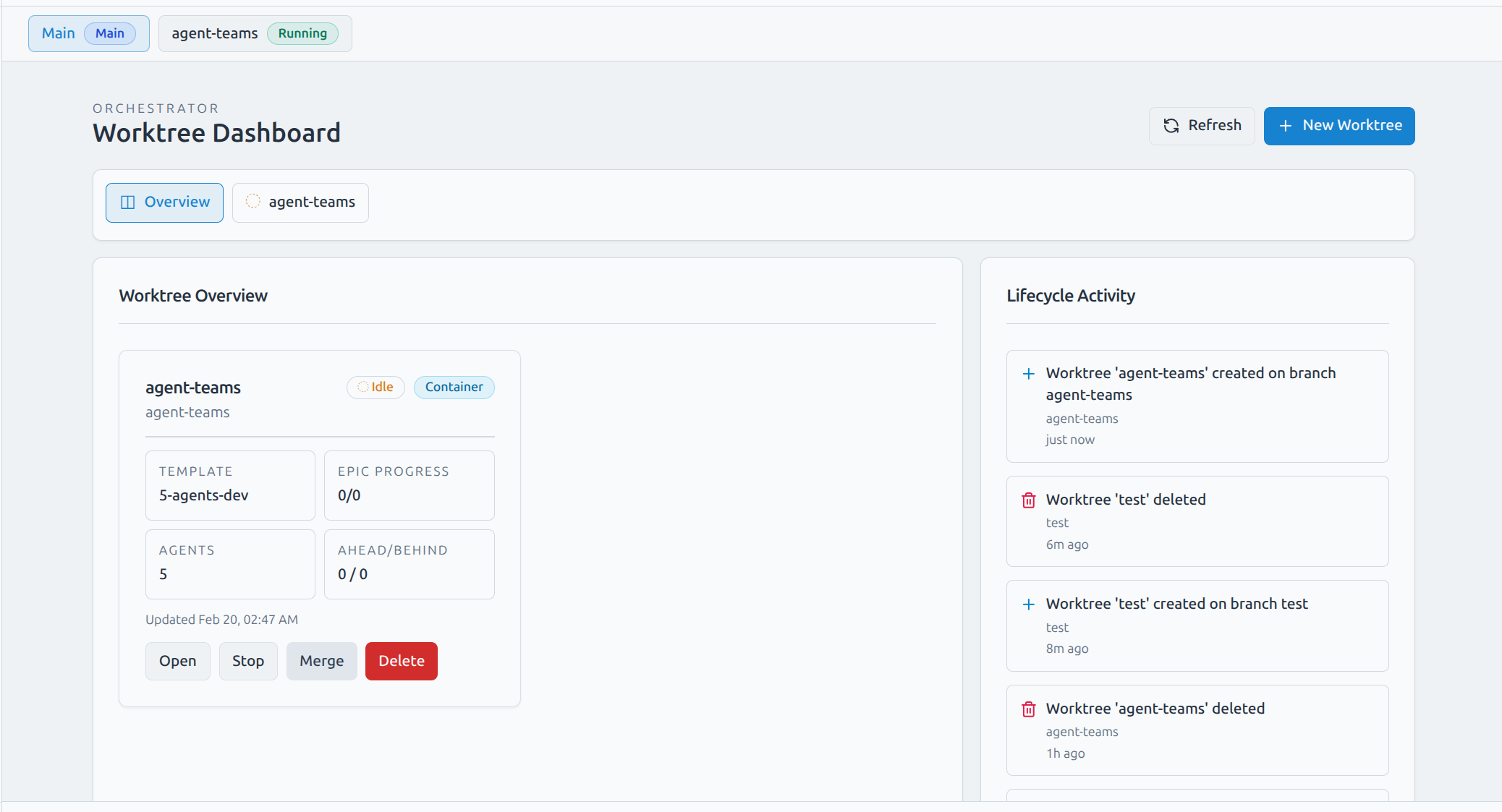
Worktrees are the most requested feature — and they're finally here. A worktree is an isolated agent environment that runs your full AI team on a dedicated git branch, completely separate from your main project. You can create multiple worktrees in parallel, each tackling a different feature, and merge them back when ready.
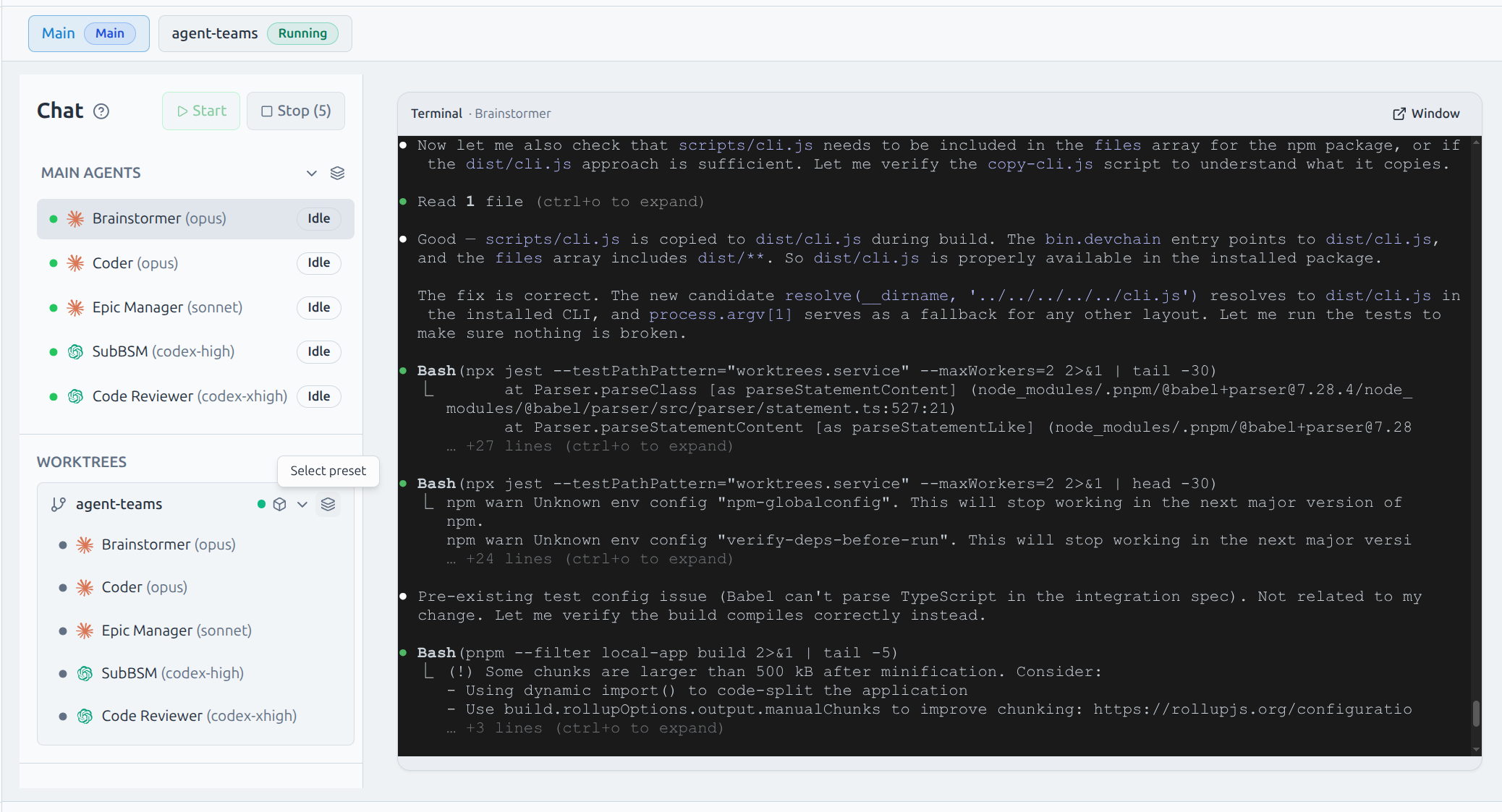
Each worktree gets its own branch, its own set of agents, its own terminal sessions, and its own chat. You switch between worktrees using tabs at the top of the UI, and the main project always stays accessible alongside them.
How it works
Create a worktree from the dashboard: choose a branch name and template preset. Devchain spins up the environment, seeds it with your agent team, and opens a dedicated tab. From there you interact with the agents exactly as you would in the main project. When the work is done, hit Merge to integrate the branch back into main and clean up the worktree.
What you can do
- Create worktrees on new or existing branches with a template preset
- Switch between Main and worktree tabs without losing context
- Each worktree runs the full agent team with inline terminals and chat
- Provider and preset switching per worktree agent
- Lifecycle activity feed: created, stopped, deleted events with timestamps
- Merge branch back to main with a single click from the dashboard
- Delete a worktree removes both the environment and its git branch
- Worktree artifacts stored under
.devchain/and auto-added to.gitignore
Docker Container Isolation
Worktrees can run as fully isolated Docker containers. Each container is provisioned from the official Devchain image and gets its own filesystem, process space, and agent CLIs pre-installed — Claude Code, Codex, and Gemini CLI are all baked in.
Container isolation means agents in one worktree can never interfere with another. They operate in a clean environment with access to your project files via volume mounts, and share your host git identity so commits are attributed correctly.
If Docker is not available, worktrees fall back to running as local processes on the host — providing the same branch isolation and agent team without container overhead. Devchain auto-detects the appropriate runtime on startup.
Image provisioning
The worktree image is pulled automatically from GHCR on first use. No manual setup required.
Claude Automation
Claude Code Hooks
Devchain now integrates with Claude Code's session hooks to improve auto-compact handling. When Claude compacts the context, Devchain ensures your agent instructions are preserved and re-injected, making long-running sessions significantly more stable and reliable.
Auto-Compact Improvements
Auto-compact is now the recommended way to run Claude sessions.
With hooks keeping sessions stable and auto-compact safely managed, long-running Claude agent sessions are now more reliable than ever.
UI Improvements
Compact Sidebar
The sidebar now supports a compact minimized mode with icon and label, and all sections can be individually collapsed. Collapsed state persists across page reloads, so your workspace stays exactly how you left it.
Navigation Shortcuts
Keyboard shortcuts for worktree switching are now available in all modes. A dedicated worktrees shortcut has been added to the sidebar for quick access.
Template Improvements
Template Renaming
To unify template naming conventions, the old 5 Agents template is now called 5-agents-dev. The name better reflects its purpose: a full development team with Brainstormer, Epic Manager, SubBSM, Coder, and Code Reviewer.
New: 3-agents-dev
A lighter template for token-efficient development. The 3-agents-dev template consolidates planning into a single agent by dropping the separate Epic Manager, leaving a streamlined team of three for faster iteration with lower token overhead.
Both templates have been updated with the latest SOP improvements including worktree awareness and Claude hooks integration.
Full Changelog
- Worktrees: launch isolated agent environments as Docker containers or local processes, each with their own branch, terminal, and chat
- Container isolation: auto-provision worktree image from GHCR, run agents as non-root with full git identity and Docker CLI access
- Worktree UI: central chat hub with per-worktree terminals, inline agent chat, preset and provider switching, real-time status updates
- Claude Code hooks: integrate Claude Code hook events with DevChain automation
- Auto-compact: non-blocking recommendation with provider-specific thresholds replacing hard block
- UI: compact collapsible sidebar, persistent section state, board context menu with move-to-worktree action
- Templates:
5-agents-devrename and new3-agents-devlightweight template - CLI: PM-aware auto-update (npm/pnpm detection), adaptive tmux session detection replacing fixed wait
Update
After updating, upgrade your project template to 5-agents-dev from the project Import Configuration page.