Run a team of AI coding agents.
On your machine.
DevChain orchestrates Claude Code, Codex, OpenCode, Antigravity, and Copilot as coordinated teams — planning on a shared board, building in real tmux terminals, and going through code review before you merge. Your keys, your hardware, your code.
From an idea to merged code
One loop that covers planning, building, and review — with you approving the moments that matter
-
Plan
Describe what you want to build. The Planning team researches your codebase from several angles in parallel and drafts a master plan with phases, epics, and acceptance criteria for your approval.
-
Build
The Builders team picks up each task in its own tmux session, choosing the right model for the job and adding Coders when the workload grows. Watch every terminal live — or step in and take over.
-
Review and merge
Review diffs with inline comments on the web and merge when it's right. From your phone, monitor agents, chat, answer their questions, reassign epics, and comment on the board.
Everything a team of agents needs
Coordination, visibility, and control — the pieces that turn parallel agents into a working team
Teams that manage themselves
Builders add Coders when work piles up and pick the right model per task — cheaper models for routine changes, top-tier models for the hard parts.
Watch every agent live
True tmux-backed terminals streamed to your browser with full TTY support. Scroll back, attach, interrupt, or take over any session at any moment.
A board agents actually use
Kanban-style epics and sub-epics with drag-and-drop. Agents pick up tasks and update statuses themselves through MCP tools, in real time.
Code review built in
A live pre-commit diff viewer with inline comments, @mentions, and threading — agents respond to review feedback like teammates.
See inside every session
Full transcript viewer for all five providers with token usage, cost tracking, and compaction events — plus live context-window bars per agent.
Skills and MCP built in
Sync community skill packs and give every agent the right tools automatically before each session starts.
Remote VMs
Move a project to a Proxmox or Ubuntu/Debian VM you own. Close the laptop and the agents keep working, with the board, chat, and terminals in the same app.
Set up a VM →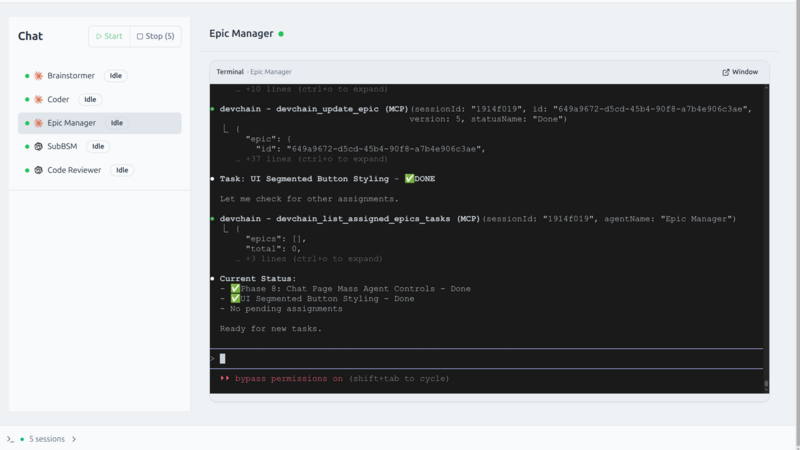
Your code stays yours
DevChain runs entirely on your machine and stores everything in a local database. There is no account, no telemetry pipeline, and no service between you and your agents.
-
Local SQLite storageProjects, epics, chats, and transcripts live in a local database on your disk.
-
Your accounts, your keysAgents are your own provider CLIs — they talk to the model providers you choose, with your credentials.
-
End-to-end-encrypted mobileIf you opt into the mobile app, your PC and phone exchange sealed data through a relay that cannot read it.
Take it with you
The DevChain mobile app, in open beta on iOS and Android: chat with agents, answer their questions the moment they ask, reassign epics and comment on the board, watch a live terminal viewport, and get push notifications when a session stops or needs you. Reviewing and merging stay on the web — the phone is your mission control on the go.
Bring the agents you already use
DevChain drives the official CLIs — sessions and transcripts work with all five
Model families such as GLM are available through per-provider configs — and you can switch any agent's provider or model on the fly, without touching templates.
Up and running in minutes
Node.js 24 LTS, tmux, and at least one provider CLI is all you need
-
Install
npm i -g devchain-cliNo account or cloud setup required
-
Start
devchain startOpens the UI in your browser on localhost
-
Create a project
Import the teams-dev template and choose which providers your teams can use
-
Describe the work
Start the Brainstormer session and tell it what you want to build
teams-dev
Planning team · Builders team · Code Reviewer
Two teams that manage themselves: Builders grow with the workload and route tasks to the right model; Planning validates every plan against your codebase before you approve it.
View the workflow guide →Latest updates
New releases and guides, straight from the changelog
Put a team on it.
One command to install. Your first agent team is a template import away.