Agent Teams
Auto-scaling Builders, parallel planning, and tier-aware routing — the new teams-dev template replaces 5-agents-dev as the recommended flow.
From a fixed cast to an organized team
Until now, every project shipped with the same five agents in a flat list: one Brainstormer, one SubBSM, one Epic Manager, one Coder, one Code Reviewer. If your work piled up, you waited — the Coder was a bottleneck. If your plan was complex, you got a single second opinion from SubBSM and that was it.
0.12.0 introduces Agent Teams as a first-class concept. Agents are now
grouped into named teams with a designated team lead. The new teams-dev template
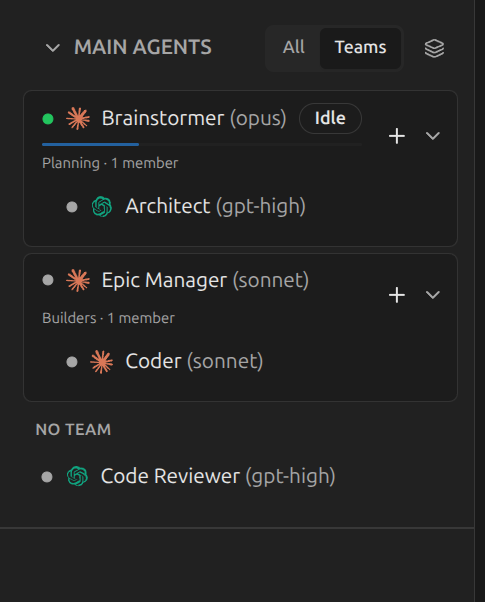
ships two teams out of the box — Planning (led by the Brainstormer)
and Builders (led by the Epic Manager) — and the team leads do real
management: they spawn the right workers for the job, route by task complexity, and reuse
idle members instead of reassigning blindly.
Planning team — parallel planning by default
Parallel independent planning — for large or architecturally novel tasks, the Brainstormer can broadcast the user's raw request to every other member of the Planning team. Each member runs its own research and produces its own framing in parallel. Diverse perspectives, not validation. The Brainstormer reconciles, picks the strongest framings, and only then enters technical validation. This was not possible before — the previous flow was capped at one fixed peer (SubBSM).
The Planning team starts with two members: Brainstormer as the team lead and
one Architect peer. That single peer already changes plan quality — but
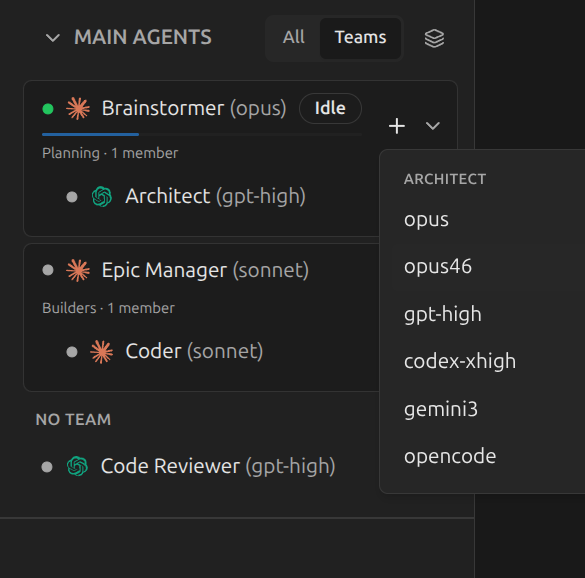
the real upgrade is that the Planning team is now scalable. Click the
+ button on the team and you can add another Architect using any provider config
you want: Opus, Opus 4.6, GPT high, Codex high, Gemini 3, OpenCode — whatever you have.
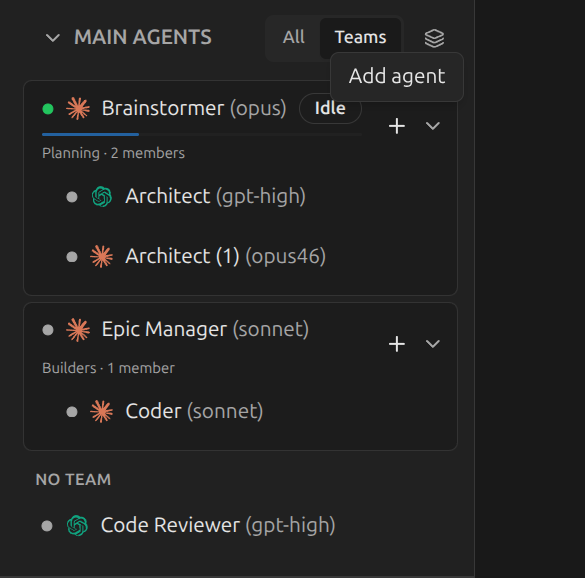
Each extra Architect is a different mind on the same problem. When the Brainstormer asks the team to research independently, you get N parallel framings instead of one, with N different model strengths covering each other's blind spots. For ambiguous or cross-cutting work, this is the difference between a plan that holds up and a plan that breaks during execution.
How the broadcast works
The Brainstormer hands the user's request to the rest of the Planning team and they each go research independently. Replies come back as chat messages and are reconciled into the master plan. Validation rounds work the same way — so adding planners scales both ideation and review.
Builders team — smart auto-scaling
Tier-aware routing. The Builders team lead (Epic Manager) doesn't just spawn Coders — it picks the right tier for each task. Cheap tasks get cheap configs. Architecture-grade work gets smart configs. Idle workers get reused before new ones are created. Related tasks batch onto the same agent to preserve loaded context. You stop paying smart-tier prices for trivial sub-epics.
Pick your providers up front
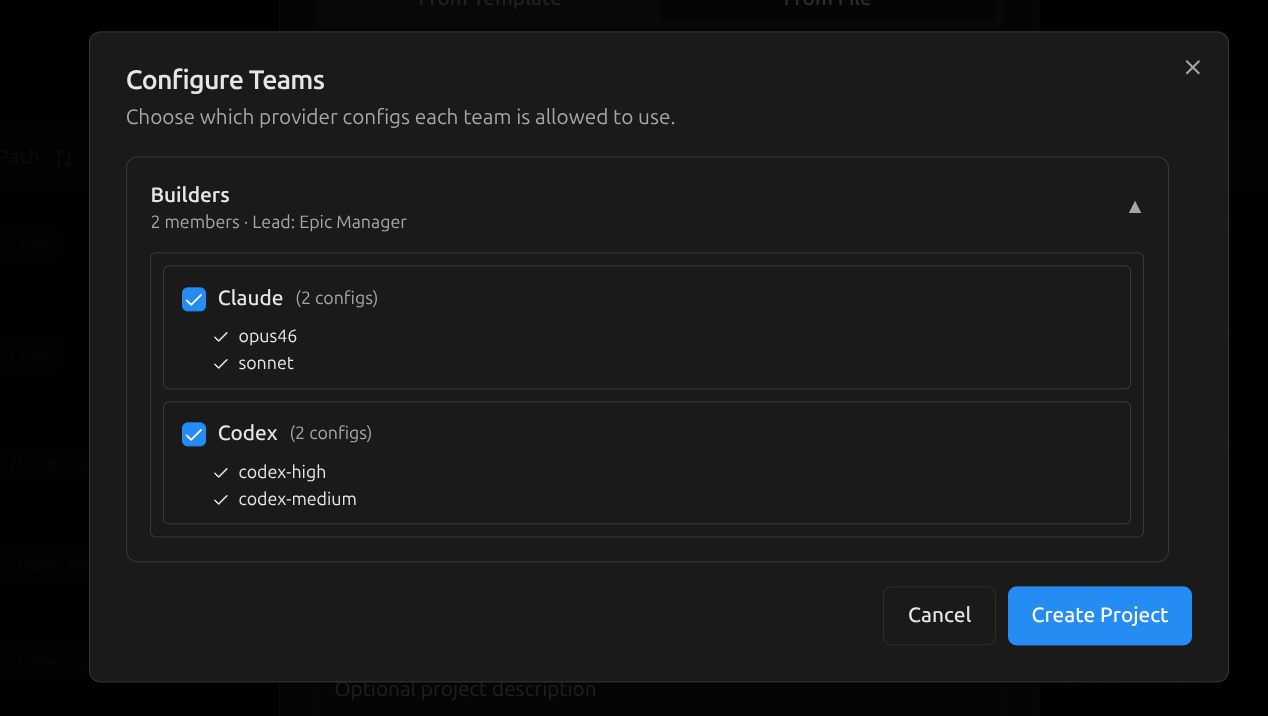
When you create a project from the teams-dev template, a
Configure Teams dialog asks which provider configs the Builders team is
allowed to use. Pick Claude only, Codex only, or both — mix and match by model tier.
The team lead is then bounded to that allowlist when it spawns workers.
Workers appear when work appears
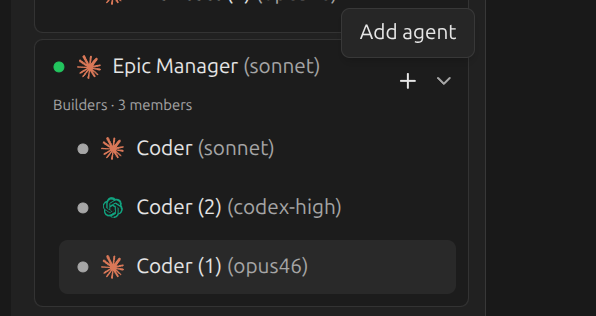
The Builders team starts with one Coder. As epics arrive, the Epic Manager evaluates each
sub-epic's complexity tier — cheap (config edits, renames), middle (UI components, schema
additions), or smart (cross-module refactors, novel API design) — and decides whether
to reuse an idle Coder, batch onto a busy one, or spawn a new worker at the right config tier.
All within the team's maxMembers and maxConcurrentTasks caps.
Why this beats a fixed Coder
You're still in charge
Autonomous scaling is a default, not a lock-in. Every team can be steered manually.
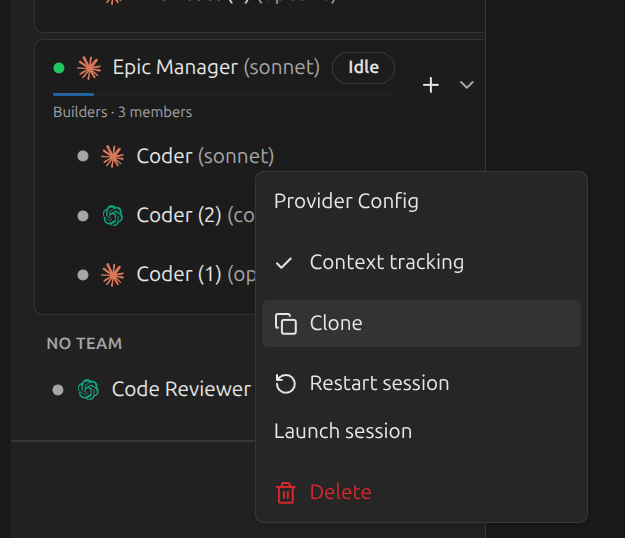
Clone, delete, restart any agent from the sidebar
Right-click any team member to clone it (carries the same role and provider config), delete it, restart its session, or open the provider menu to switch configs. Team membership is no longer fixed by the template — it's a live roster.
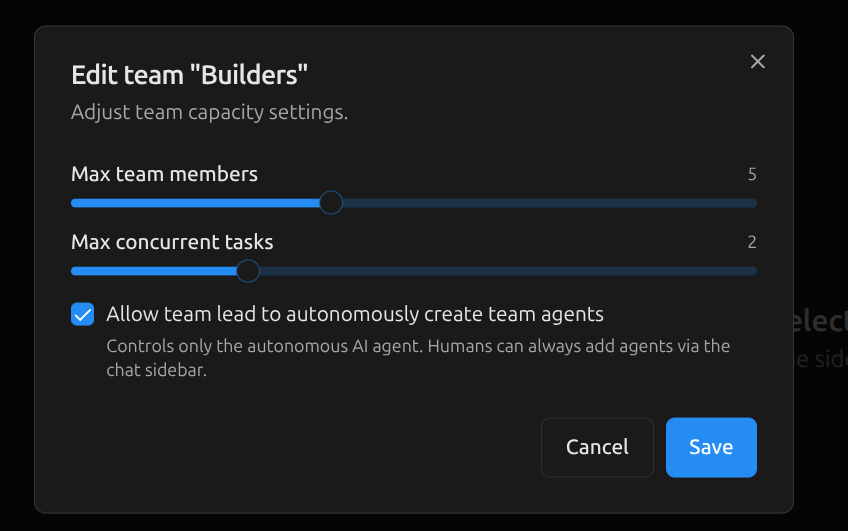
Edit team capacity and disable autonomous creation
Right-click a team header and pick Edit team to adjust
Max team members, Max concurrent tasks, and toggle
Allow team lead to autonomously create team agents. Turn the toggle off and
the team lead stops spawning workers entirely — you decide every roster change yourself.
Recommended replacement for 5-agents-dev
The new teams-dev template is a smart, cost-efficient upgrade over
5-agents-dev for new projects. Same SOPs, same review flow, but the agent
structure is materially better:
Existing projects keep working
5-agents-dev is still bundled and supported — nothing breaks if you stay
on it. New projects should start from teams-dev; existing projects can switch
when convenient. Templates are versioned per-project, so the upgrade is on your timeline.
Full Changelog
- Agent Teams: teams and team_members as first-class concepts; per-project teams with optional team lead and member roster
- Teams UI: dedicated
/teamspage (list, create, edit, disband), sidebar entry,g tshortcut, Chat sidebar grouping by team - Auto-scaling Builders: Epic Manager spawns Coders at the right config tier per task complexity, batches related work, reuses idle workers, respects capacity caps
- Parallel planning: Brainstormer broadcasts the user's request to all Planning team members for independent research; reconciliation precedes technical validation
- Configure Teams at project creation: per-team provider-config allowlist, plus an auto-agent toggle to enable or disable autonomous team-lead scaling
- Team management UI: Edit team modal (max members, max concurrent tasks, autonomous-creation toggle), per-team config selection, Add agent quick action, agent Clone/Delete/Restart from the Chat sidebar
- MCP team tools:
devchain_team,devchain_teams_list,devchain_teams_members_list,devchain_teams_create_agent,devchain_teams_delete_agent,devchain_teams_configs_list;devchain_send_messageresolves the caller's team automatically - Live updates: ProjectStateBroadcasterSubscriber + chat-socket integration so agent and team mutations propagate to all open clients in real time
- Handlebars prompt engine: scoped template variables in prompts (
is_team_lead,team_name, etc.) and in subscribersend_agent_message.text - Project import: new
ProjectTeamPreconfigDialogwhen importing team templates — preserves provider-config selection and redacts environment values - Provider improvements: machine-global env vars with sanitized template round-trip; default
CLAUDE_CODE_NO_FLICKER=1on new and existing Claude provider rows; provider config description column; fix for MCP WARN false positives on the Providers page - Sub-epic notifications: new subscriber notifies the parent assignee when a sub-epic is created
- Stronger MCP epic handoff hint: requires explicit assignment check before proceeding
- Terminal: OSC 52 clipboard relay (terminal copy now reaches the system clipboard); inline-terminal corruption fix on cross-agent restart; clipboard toast styling matches other DevChain toasts
- Templates: new
teams-devtemplate (recommended); regenerated bundled exports to v1.1.21 - Packaging: sync local-app dependencies to root
devchain-cli; ship the newcodebase-overviewpackage with the CLI - Docs: consolidated agent-facing documentation; trimmed legacy plan docs and CLI build notes
Update
Existing projects continue to work without changes. To try Agent Teams, create a new project
from the teams-dev template — the Configure Teams dialog appears as part
of the create flow.
Prefer to compare templates first? Browse all Quick Start Guides.