What's New in Devchain 0.8.0
Preset system, multi-provider support, and GLM integration
Preset System
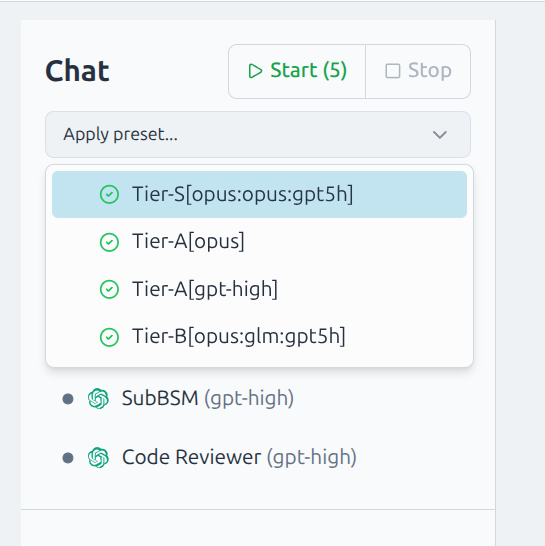
Instead of maintaining multiple templates based on the same development flow (5 agents), a preset system is introduced which allows you to switch a project between different sets of agents (Claude/Codex/Gemini/GLM) with a single click.
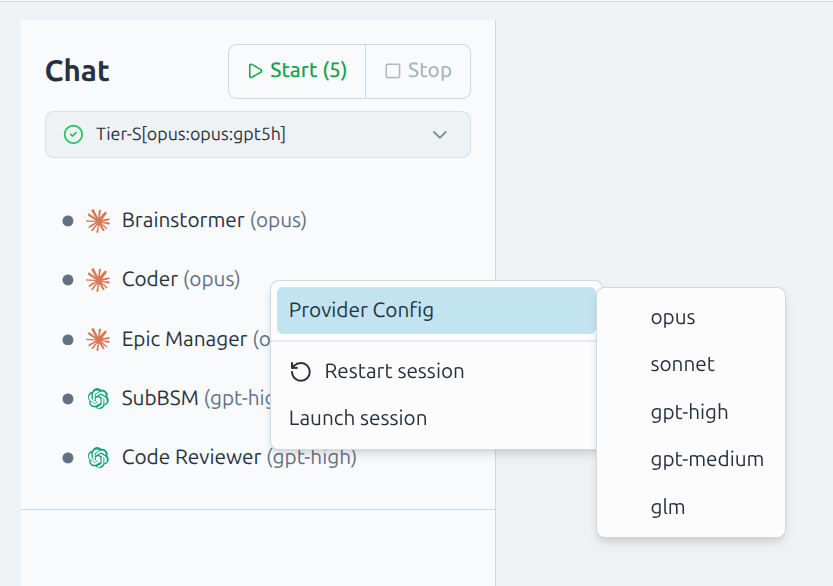
On top of this, you can also switch a single agent to a different model via the context menu:
Migrating existing projects
All existing templates will be migrated automatically to support the new system, but they will lack presets. If you want to use presets, switch your project to the new unified "Dev Loop" template through the project page → Import Configuration option.
GLM Support
GLM model support is added through the Claude CLI. In combination with other higher-tier models, GLM in the workflow gives near-Sonnet level results at very low cost.
If you are planning to use GLM as the coder, set your z.ai API key for the Coder profile:
- Go to Agent Profiles → Coder → Edit
- Select the glm provider config → Edit
- Replace
GLM_TOKENwith your z.ai API key and save
GLM is currently preconfigured for the Coder profile, but you are not limited to this and can use it in other roles as well.
Full Changelog
- Preset system in templates: switch your favorite AI teams with presets with a single click
- Multi-provider support: support GLM models through Claude
- Tab-independent project selection with hybrid storage
- Activity signal filtering to prevent spurious agent busy states
- Session fixes: duplicate agent sessions race condition, nested lock deadlock, timing delays for slower CLI providers