What's New in Devchain 0.9.0
Skills system — a shared knowledge layer for AI agents
To take advantage of skills in your agent workflows, update your project to DevLoop v1.0.6 or later. Go to your project page → Import Configuration and re-import the DevLoop template. The updated template includes skill discovery steps in the SubBSM, Epic Manager, and Coder SOPs.
Skills System
Skills are domain-specific knowledge packs — curated instructions, best practices, and procedures that your AI agents can discover and apply during planning and implementation. Instead of relying solely on general-purpose knowledge, agents now pull in targeted guidance for the task at hand.
Skills are synced from open-source repositories maintained by leading AI labs and engineering teams. Each skill contains structured instructions that agents read and apply as additional context when reviewing plans or writing code.
How it works
Skills follow a discover → attach → consume pattern. The Epic Manager matches relevant skills to each task and attaches them. When the Coder picks up the task, it fetches the skill instructions and applies them as implementation guidance. The SubBSM also uses skills to validate plans against domain best practices.
How Agents Use Skills
Three agents in the DevLoop workflow now integrate with skills at different stages:
SubBSM (Technical Lead)
Before reviewing a draft plan, the SubBSM discovers skills relevant to the plan's domain (e.g., security skills for auth plans, testing skills for test plans) and uses their guidance to strengthen or challenge the proposed approach.
Epic Manager
Before assigning a sub-epic to the Coder, the Epic Manager scans available skills and attaches
relevant ones to the task via skillsRequired. This acts as a knowledge briefing
for the implementing agent.
Coder
When picking up a task, the Coder checks for attached skills and fetches their full instruction content. These instructions are applied as additional implementation guidance alongside the task's acceptance criteria and project standards.
Skill Sources
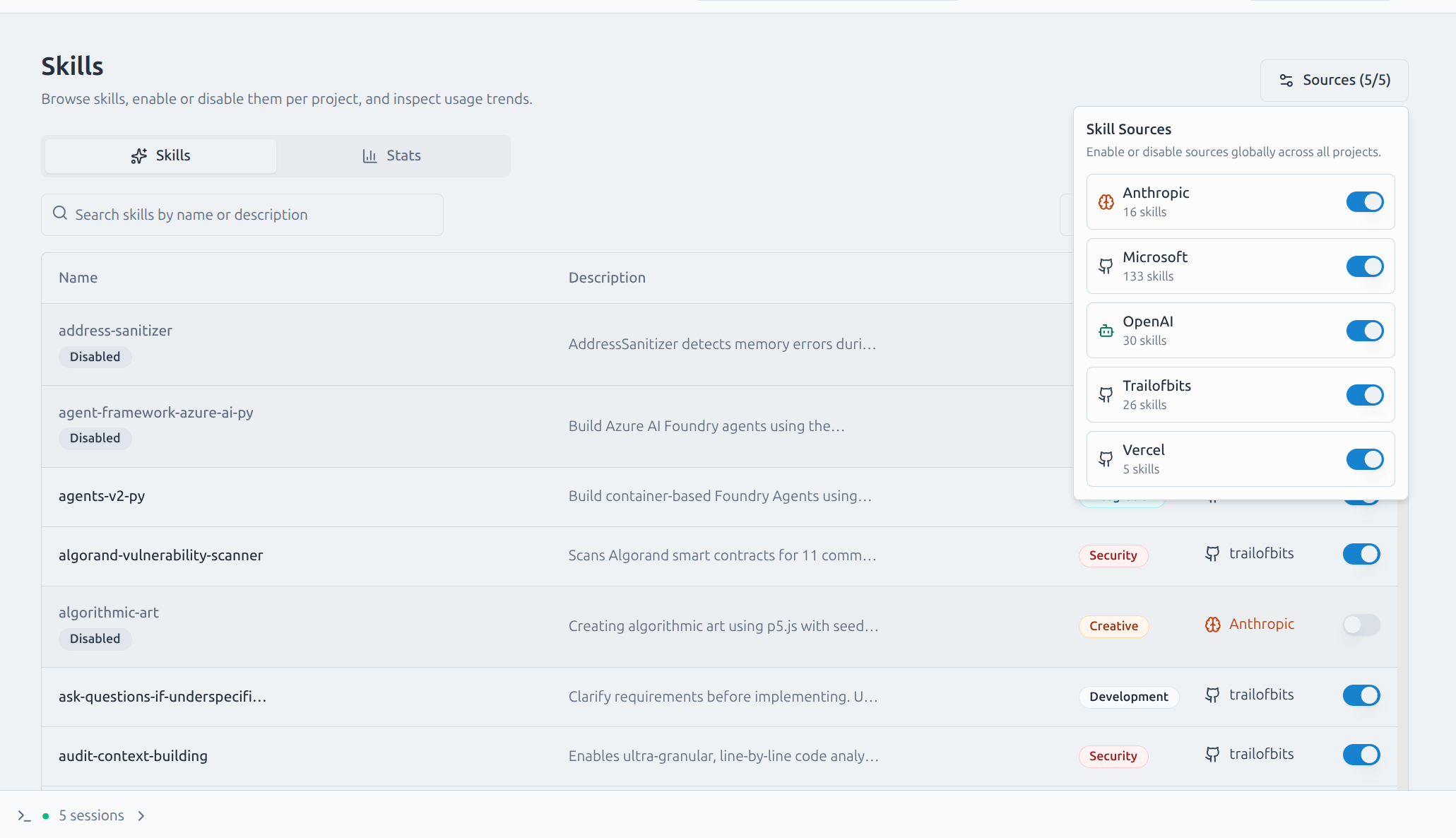
Skills are synced from curated open-source repositories. Each source can be individually enabled or disabled per project from the Skills management page.
Skills sync automatically on startup and can be manually triggered from the UI. Each skill tracks its source commit for version awareness.
Skills Management
A dedicated management page lets you browse, search, and control which skills are available to your project's agents.
What you can do
- Browse all synced skills with search across name, description, and category
- Enable or disable individual skills per project
- Enable or disable entire sources at once
- View full skill details including instructions, resources, and metadata
- Monitor usage statistics to see which skills your agents are using
- Trigger manual sync to pull the latest skills from all sources
MCP Tools
Two new tools are exposed via MCP for agents to interact with skills:
devchain_list_skills
Discover available skills with optional keyword search. Returns skill slug, name, source, category, and description. Only returns skills that are enabled for the project.
devchain_get_skill
Fetch full skill details by slug (e.g., anthropic/code-review).
Returns the complete instruction content, resources, license, and metadata.
Records usage for analytics.
Full Changelog
- Skills management module with sync engine, storage, and per-project controls
- Five skill source adapters: Anthropic, OpenAI, Vercel, Trail of Bits, Microsoft
- Source-level enable/disable controls with per-skill overrides
- Skills UI: browsing, search, detail drawer, usage stats
- MCP tools:
devchain_list_skillsanddevchain_get_skillfor agent access - DevLoop template v1.0.6: skills integration in SubBSM, Epic Manager, and Coder SOPs
- Missing Drizzle migration snapshot fix for migration 0037
Update
After updating, re-import the DevLoop template in your projects to enable skill-aware agent workflows.